Google Ads for eCommerce: Scale Profitable Sales
Everything you need to know about running profitable Google Ads for your online store—from Shopping campaigns and Performance Max to feed optimization and scaling strategies.

Why Google Ads Works for eCommerce
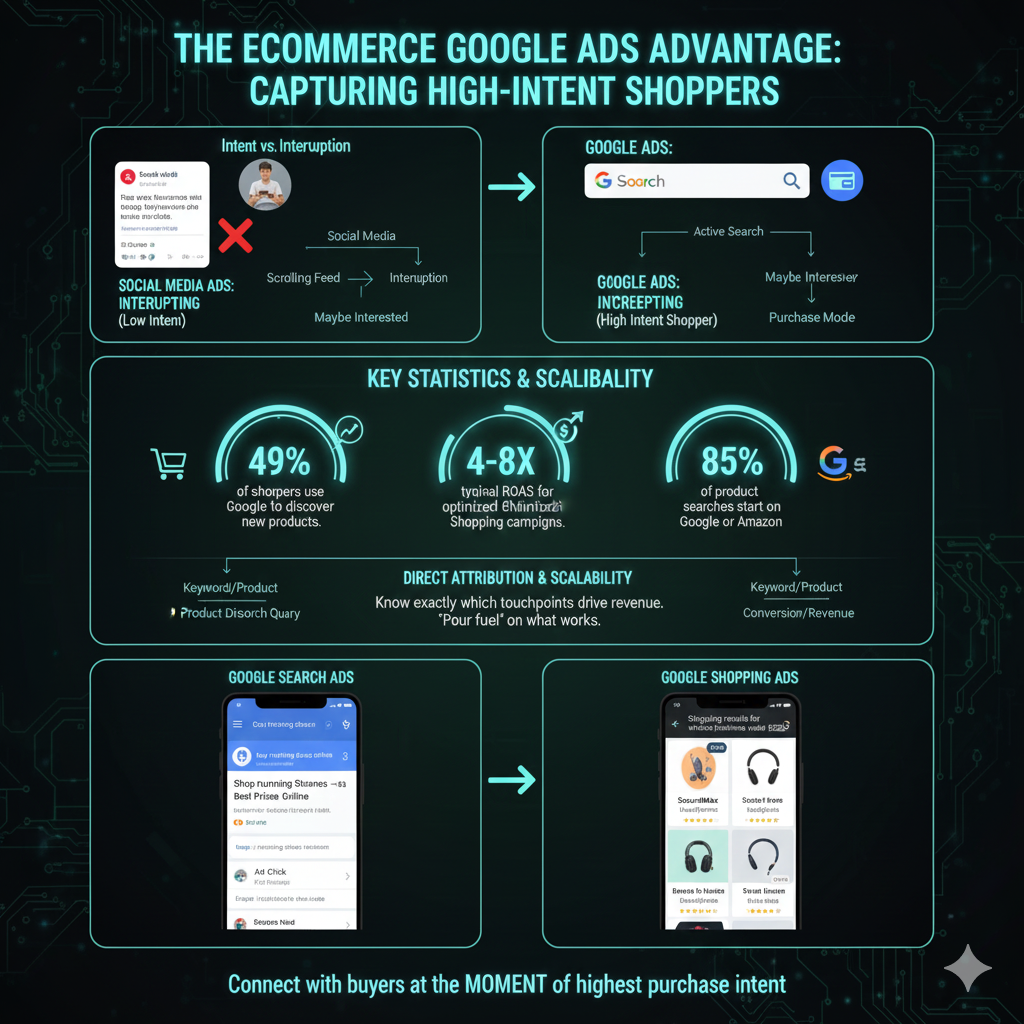
Google Ads is the most powerful acquisition channel for eCommerce businesses because it captures high-intent shoppers at the exact moment they're ready to buy. Unlike social media advertising where you're interrupting someone's feed, Google Ads places your products in front of people actively searching for what you sell.
Consider this: when someone searches "buy running shoes online" or "best wireless headphones under $200," they're not casually browsing—they're in purchase mode. Google Shopping and Search ads let you intercept these high-intent searches and convert them into customers.
of shoppers use Google to discover new products
typical ROAS for optimized Shopping campaigns
of product searches start on Google or Amazon
The eCommerce Google Ads Advantage
Unlike brand awareness channels, Google Ads provides direct attribution—you know exactly which products, keywords, and campaigns drive revenue. This allows for precise optimization and confident scaling. When you find a product-keyword combination that converts profitably, you can pour fuel on that fire.
Google Shopping Campaigns Deep Dive
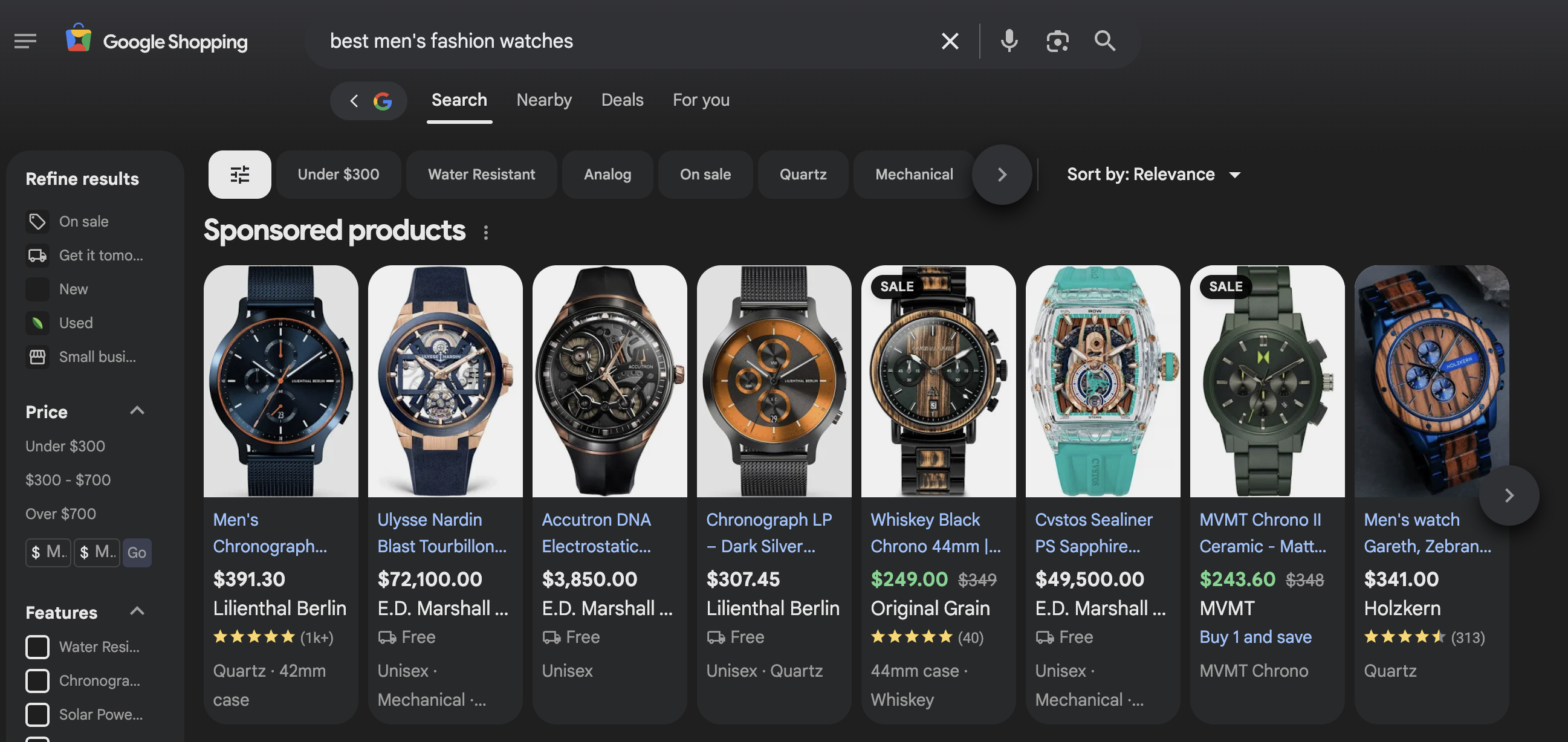
Google Shopping ads (also called Product Listing Ads or PLAs) display your products directly in search results with an image, price, store name, and reviews. They're the visual product cards you see at the top of Google when searching for products—and they're responsible for the majority of eCommerce ad clicks.
Unlike Search ads where you bid on keywords, Shopping ads work by matching your product feed data to user searches. Google's algorithm determines which products to show based on your feed quality, bids, and relevance. This makes feed optimization absolutely critical.
Shopping Campaign Structure Best Practices
- Segment campaigns by product category, margin tier, or performance level
- Use custom labels to group products by profitability, seasonality, or priority
- Set up brand vs. non-brand campaign splits for budget control
- Create separate campaigns for top performers with aggressive bids
- Use negative keywords to prevent irrelevant traffic
- Implement portfolio bid strategies across related campaigns
Standard Shopping Advantages
- • Full control over bidding and targeting
- • Detailed search term reporting
- • Granular campaign segmentation
- • Negative keyword capabilities
- • Predictable, transparent performance
- • Better for tight budget management
When to Prioritize Shopping
- • You have a large product catalog (100+ SKUs)
- • You need granular control over bids
- • You want detailed search term insights
- • You're managing tight profit margins
- • You have specific products to prioritize
- • You prefer transparency over automation
Pro Tip: The Priority Bidding Strategy
Use campaign priorities (High, Medium, Low) combined with shared negative keyword lists to funnel traffic through campaigns strategically. High-priority campaigns catch broad searches with lower bids, while low-priority campaigns capture high-intent branded/specific searches with higher bids. This structure maximizes efficiency across your entire catalog.
Performance Max for eCommerce
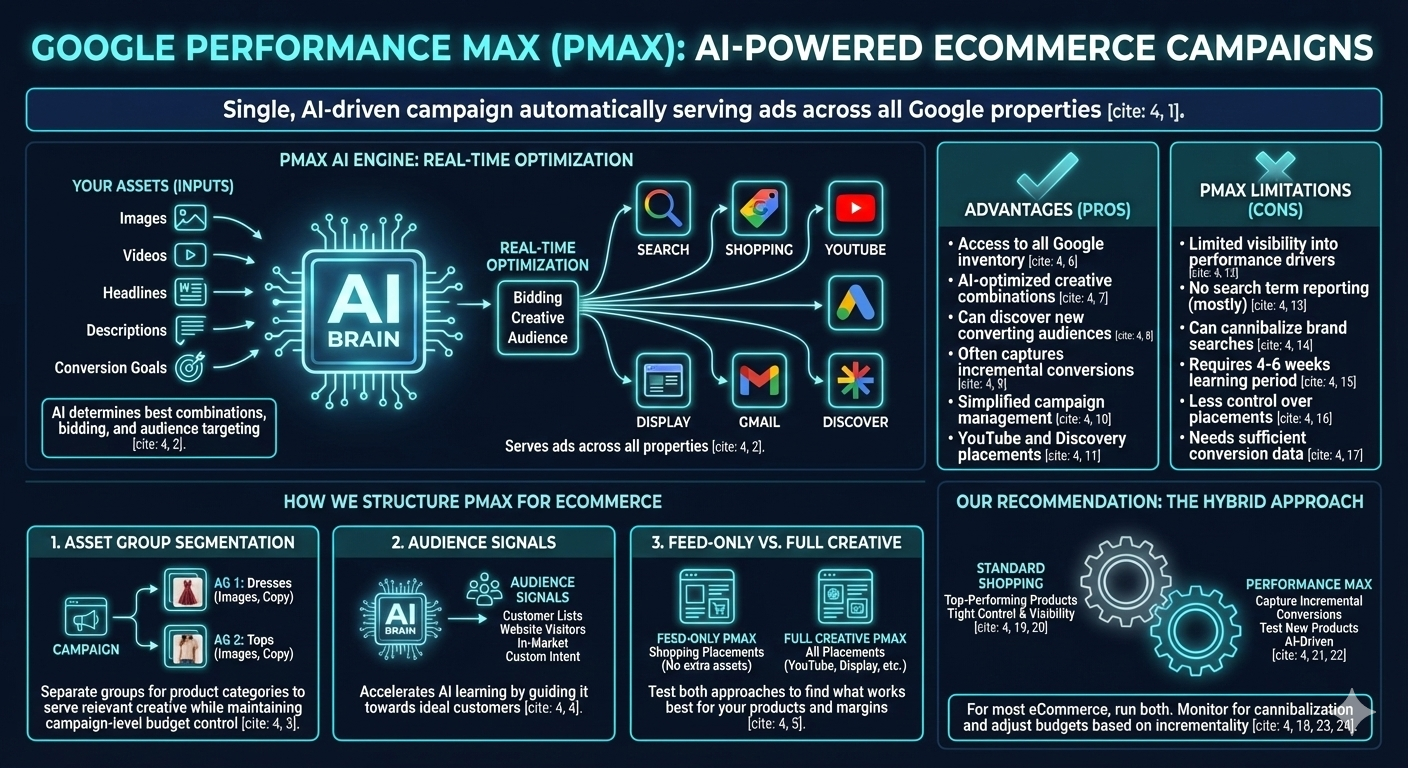
Performance Max (PMax) is Google's AI-powered campaign type that automatically serves your ads across all Google properties—Search, Shopping, YouTube, Display, Gmail, and Discover—from a single campaign. For eCommerce, PMax has become increasingly important as Google pushes automation.
PMax uses machine learning to optimize creative combinations, bidding, and audience targeting in real-time. You provide the assets (images, videos, headlines, descriptions) and conversion goals, and Google's AI determines the best combinations and placements.
How We Structure PMax for eCommerce
1. Asset Group Segmentation
We create separate asset groups for different product categories or collections. This allows Google to serve relevant creative for each product type while maintaining campaign-level budget control. A fashion brand might have asset groups for "Dresses," "Tops," "Accessories," each with category-specific images and copy.
2. Audience Signals
While PMax finds audiences automatically, providing audience signals accelerates learning. We add your customer lists, website visitors, in-market audiences, and custom intent audiences as signals to guide the AI toward your ideal customers.
3. Feed-Only vs. Full Creative
Some advertisers run "feed-only" PMax (no additional assets) to focus purely on Shopping placements. Others provide full creative assets to access YouTube and Display inventory. We test both approaches to find what works best for your products and margins.
PMax Advantages
- • Access to all Google inventory from one campaign
- • AI-optimized creative combinations
- • Can discover new converting audiences
- • Often captures incremental conversions
- • Simplified campaign management
- • YouTube and Discovery placements
PMax Limitations
- • Limited visibility into performance drivers
- • No search term reporting (mostly)
- • Can cannibalize brand searches
- • Requires 4-6 weeks learning period
- • Less control over placements
- • Needs sufficient conversion data
Our Recommendation: The Hybrid Approach
For most eCommerce stores, we recommend running both Standard Shopping and Performance Max. Use Standard Shopping for your top-performing products where you want tight control and visibility. Use Performance Max to capture additional inventory, test new products, and let AI find incremental conversions. Monitor for cannibalization and adjust budgets based on incrementality.
Search Campaigns for Online Stores
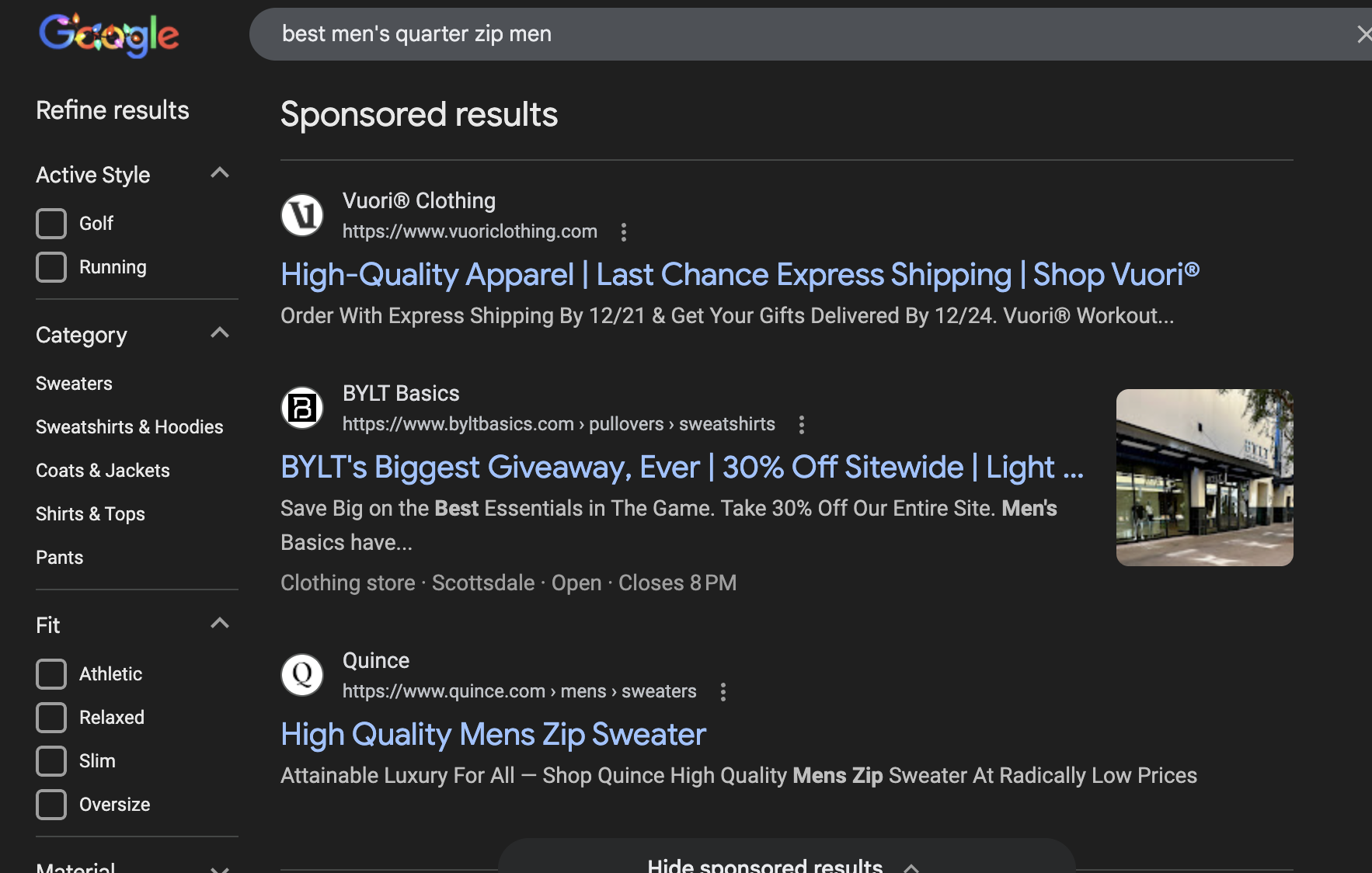
While Shopping ads dominate product searches, Search campaigns remain essential for eCommerce. They capture searches that Shopping can't—informational queries, comparison searches, and branded terms—while providing messaging control that Shopping lacks.
High-Intent Keywords to Target
- • "buy [product] online"
- • "best [product category] 2025"
- • "[product] free shipping"
- • "[product] reviews"
- • "[competitor] alternative"
- • "[product] discount code"
- • "where to buy [product]"
Search Campaign Types
- • Brand campaigns: Protect your brand searches
- • Category campaigns: Non-brand product terms
- • Competitor campaigns: Conquest competitor searches
- • DSA campaigns: Dynamic Search Ads for coverage
- • RLSA campaigns: Search targeting past visitors
Brand Campaign Strategy
"Should I bid on my own brand name?" is one of the most common questions we get. The answer is almost always yes—here's why:
- Competitors may be bidding on your brand terms
- Brand CPCs are extremely cheap (often $0.20-0.50)
- Control your messaging and highlight current promotions
- Dominate the SERP with ads + organic + Shopping
- Capture users who might click a competitor's ad instead
- Brand traffic converts at 5-10x higher rates than non-brand
Pro Tip: Non-Brand Search Strategy
Non-brand Search campaigns require patience and budget. Start with exact match keywords for your highest-margin, best-selling products. Use phrase match to expand once you have baseline performance data. Avoid broad match until you have robust negative keyword lists built from search term analysis.
Dynamic Remarketing & Retargeting
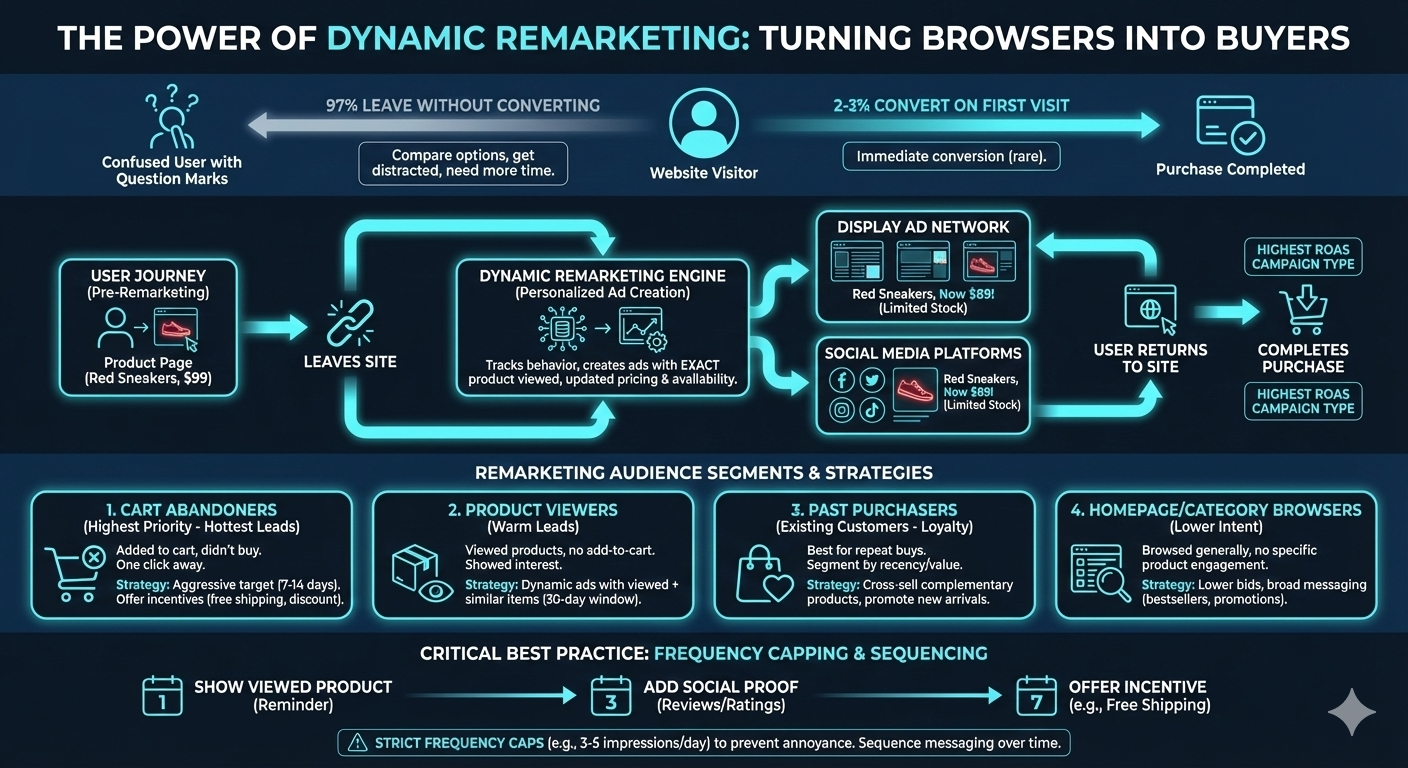
Only 2-3% of first-time visitors convert. The other 97% leave—often to compare options, get distracted, or simply need more time. Dynamic remarketing brings them back by showing personalized ads featuring the exact products they viewed, with updated pricing and availability.
For eCommerce, remarketing is typically the highest-ROAS campaign type. You're targeting people who already know your brand and have shown purchase intent—they just need a nudge to complete the transaction.
Remarketing Audience Segments
Cart Abandoners (Highest Priority)
Users who added items to cart but didn't purchase. These are your hottest leads—they were one click away from buying. Target them aggressively with 7-14 day windows and consider offering incentives (free shipping, small discount) to close the sale.
Product Viewers
Users who viewed product pages but didn't add to cart. They showed interest but weren't convinced. Serve dynamic ads featuring the viewed products plus similar items. Use 30-day windows for consideration purchases.
Past Purchasers
Your existing customers are your best prospects for repeat purchases. Segment by recency, purchase value, and product category. Cross-sell complementary products and promote new arrivals to customers who bought related items.
Homepage/Category Browsers
Visitors who browsed but didn't engage with specific products. Lower intent than product viewers, so use lower bids and broader messaging highlighting bestsellers or current promotions.
Frequency Capping is Critical
Nothing annoys potential customers more than seeing the same ad 50 times. We implement strict frequency caps (typically 3-5 impressions per user per day) and sequence messaging over time. Day 1 might show the product they viewed, Day 3 adds social proof, Day 7 offers free shipping if they haven't converted.
Product Feed Optimization
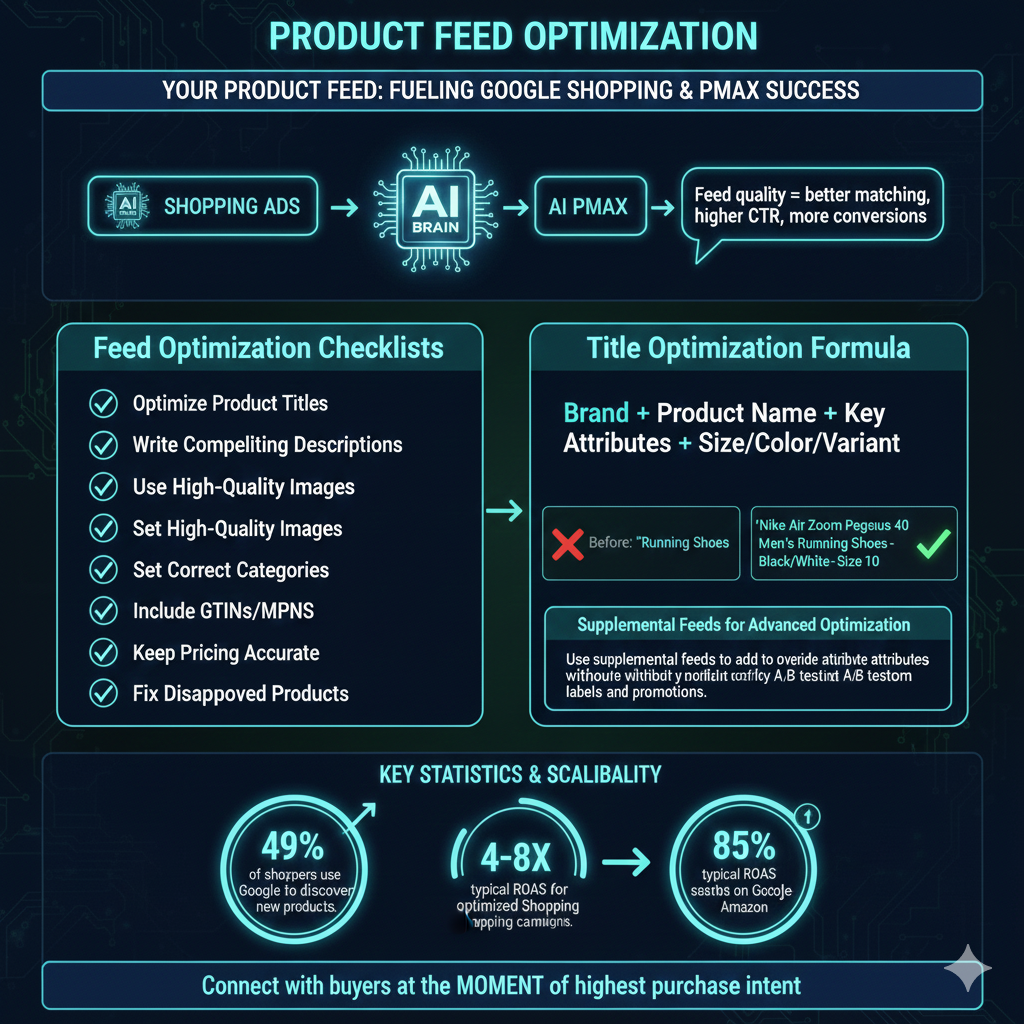
Your product feed is the foundation of Shopping and Performance Max success. Google uses your feed data to match products to searches, so feed quality directly impacts which searches trigger your ads and how well they convert.
A well-optimized feed can improve CTR by 20-40% and significantly reduce wasted spend on irrelevant searches. Yet most eCommerce advertisers simply sync their store feed without optimization—leaving massive performance gains on the table.
Feed Optimization Checklist
Title Optimization Formula
Product titles are the single most important feed attribute. Use this formula:
Before: "Running Shoes"
After: "Nike Air Zoom Pegasus 40 Men's Running Shoes - Black/White - Size 10"
Supplemental Feeds for Advanced Optimization
Use supplemental feeds to add or override attributes without modifying your primary feed. This is perfect for adding custom labels, optimizing titles for top products, adding promotional text, or fixing category mappings—all without touching your store's product data.
Conversion Tracking & Attribution
Accurate conversion tracking is the foundation of successful eCommerce advertising. Without proper tracking, you can't optimize campaigns, measure ROAS, or make data-driven decisions. In the age of iOS privacy changes and cookie deprecation, tracking setup has become more complex—and more important—than ever.
Essential Tracking Implementation
Google Ads Conversion Tracking
Implement the Google Ads conversion tag to track purchases with dynamic values (revenue, currency, transaction ID). This data feeds directly into campaign optimization and ROAS calculations.
Enhanced Conversions
Enhanced conversions use hashed first-party customer data (email, phone) to improve attribution accuracy. When a user converts, their hashed data is matched against Google's logged-in user data, recovering conversions that would otherwise be lost to cookie restrictions.
GA4 eCommerce Tracking
Implement full GA4 eCommerce tracking for deeper analysis: view_item, add_to_cart, begin_checkout, add_payment_info, and purchase events. This data enables audience building, funnel analysis, and cross-platform attribution.
Server-Side Tracking
Server-side tracking via Google Tag Manager sends conversion data from your server rather than the browser, bypassing ad blockers and improving data accuracy by 10-20%. Essential for accurate measurement in 2025 and beyond.
Attribution Model Selection
Google now defaults to data-driven attribution, which uses machine learning to assign credit across touchpoints. For most eCommerce accounts, this is the best choice. However, understand that DDA can make campaign performance look different than last-click—upper-funnel campaigns may get more credit, which is actually a more accurate representation of their value.
Scaling Profitably
The goal isn't just to increase ad spend—it's to increase profitable ad spend. Scaling eCommerce campaigns requires a systematic approach: identify what's working, double down on winners, cut losers quickly, and continuously test new opportunities.
The Scaling Framework
Identify Your Winners
Analyze performance at the product, keyword, and audience level. Which products have the best ROAS? Which search terms convert most efficiently? Double down on proven performers.
Increase Budgets Gradually
Scale budgets by 15-20% increments, allowing 1-2 weeks for algorithms to adjust. Dramatic budget increases can disrupt bidding algorithms and spike CPCs.
Expand Strategically
Once core campaigns are profitable, expand: new product categories, new keyword themes, broader audiences, new campaign types (video, Discovery), international markets.
Monitor Efficiency Metrics
Track marginal ROAS as you scale. At some point, incremental spend becomes less efficient. Understand where your efficiency curve bends and optimize for total profit, not just ROAS percentage.
ROAS vs. Profit Targets
A 6x ROAS on $10K spend ($60K revenue) might be less profitable than 4x ROAS on $30K spend ($120K revenue). We help you understand your true profit targets and scale accordingly.
Seasonal Planning
Q4 requires different strategies than Q1. We build promotional calendars, adjust budgets for peak periods, and prepare campaigns for Black Friday/Cyber Monday months in advance.
The Lifetime Value Factor
If your customers make repeat purchases, you can afford higher acquisition costs. A customer with $200 LTV can be acquired at a loss on the first order and still be highly profitable. We help you calculate true customer LTV and adjust ROAS targets accordingly—this is often the key to unlocking aggressive scaling.
Frequently Asked Questions
What ROAS should I expect from Google Ads for my eCommerce store?
Target ROAS varies significantly by industry and profit margins. Fashion and apparel typically see 3-4x ROAS, electronics 2-3x, home goods 4-5x, and beauty/cosmetics 4-6x. We work with you to determine profitable targets based on your margins, customer acquisition costs, and lifetime customer value.
Should I use Standard Shopping or Performance Max for my online store?
Both have their place in a comprehensive strategy. Standard Shopping provides more control, transparency, and granular bidding. Performance Max can unlock additional inventory across YouTube, Display, and Gmail while using AI optimization. We typically recommend a hybrid approach—Standard Shopping for your top performers with tight control, and Performance Max for discovery and scaling.
How much should I spend on Google Ads for eCommerce?
We recommend starting with a budget that allows for meaningful data collection—typically $3,000-5,000/month minimum for most eCommerce stores. This allows enough volume to optimize campaigns effectively. As you identify profitable products and audiences, you can scale budgets on winners while maintaining efficiency.
Do you work with Shopify stores?
Yes! We specialize in Shopify and Shopify Plus stores. We have deep experience with the Google & YouTube channel app, Shopify's native conversion tracking, and third-party feed management tools. We also work extensively with WooCommerce, BigCommerce, Magento, and custom platforms.
How do you optimize product feeds for better performance?
Product feed optimization is crucial for Shopping success. We optimize product titles with relevant keywords, enhance descriptions, ensure high-quality images, set correct product categories (Google Product Category), add custom labels for segmentation, fix disapproved products, and implement supplemental feeds for additional attributes. Proper feed optimization can improve CTR by 20-40%.
How long does it take to see results from Google Ads?
Most eCommerce accounts see meaningful data within the first 2-4 weeks, with optimization gains continuing over 60-90 days as we collect conversion data and refine targeting. Performance Max campaigns typically need 4-6 weeks of learning before reaching optimal performance. We provide transparent reporting throughout so you can track progress.
What's the difference between ROAS and ROI?
ROAS (Return on Ad Spend) measures revenue generated per dollar spent on ads—a 4x ROAS means $4 revenue for every $1 in ad spend. ROI (Return on Investment) factors in all costs including product costs, fulfillment, and overhead. We focus on ROAS for campaign optimization but help you understand true ROI to ensure profitability.
Can you help with conversion tracking setup?
Absolutely. Proper conversion tracking is the foundation of successful eCommerce advertising. We implement Google Ads conversion tracking, GA4 eCommerce tracking, enhanced conversions for better attribution, and server-side tracking via Google Tag Manager for improved data accuracy in a cookieless world.
Ready to Scale Your Online Store?
Get a free Google Ads strategy customized for your eCommerce business. We'll analyze your products, competition, and growth opportunities to create a roadmap for profitable scaling.